What messages does Alfy send?
See every message Alfy sends in Slack and Microsoft Teams, from round announcements and calendar invites to reminders, and when each one is sent and to whom.
 Slack
Slack Microsoft TeamsUpdated Oct 20, 20262 min read
Alfy, the BuddiesHR random coffee app, only messages people once a program exists. It announces each round, shows each match the times they're free, sends reminders until the chat is scheduled, and keeps admins informed about setup, the trial and channel problems.
To participants#
The round announcement#
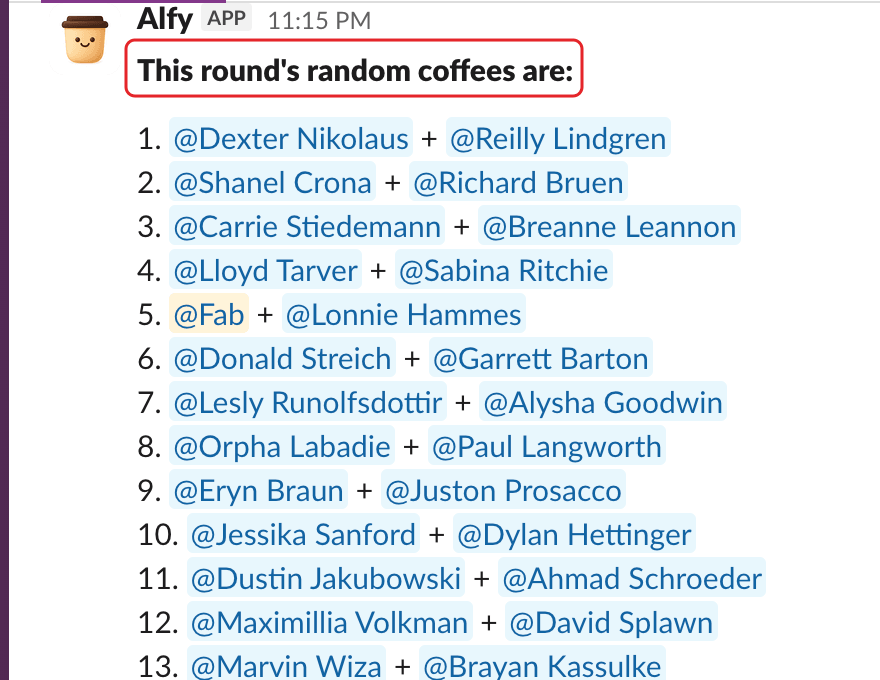
At each round, Alfy posts "This round's random coffees are:" with the list of groups in the announcement channel.
- Slack: the post has
Schedule your chat 📅andConversation starters ☕️buttons. It's sent if the program usesPost in channelorBoth. - Microsoft Teams: the post has
📅 Schedule your chatand☕️ Conversation startersbuttons.
The group DM (Slack only)#
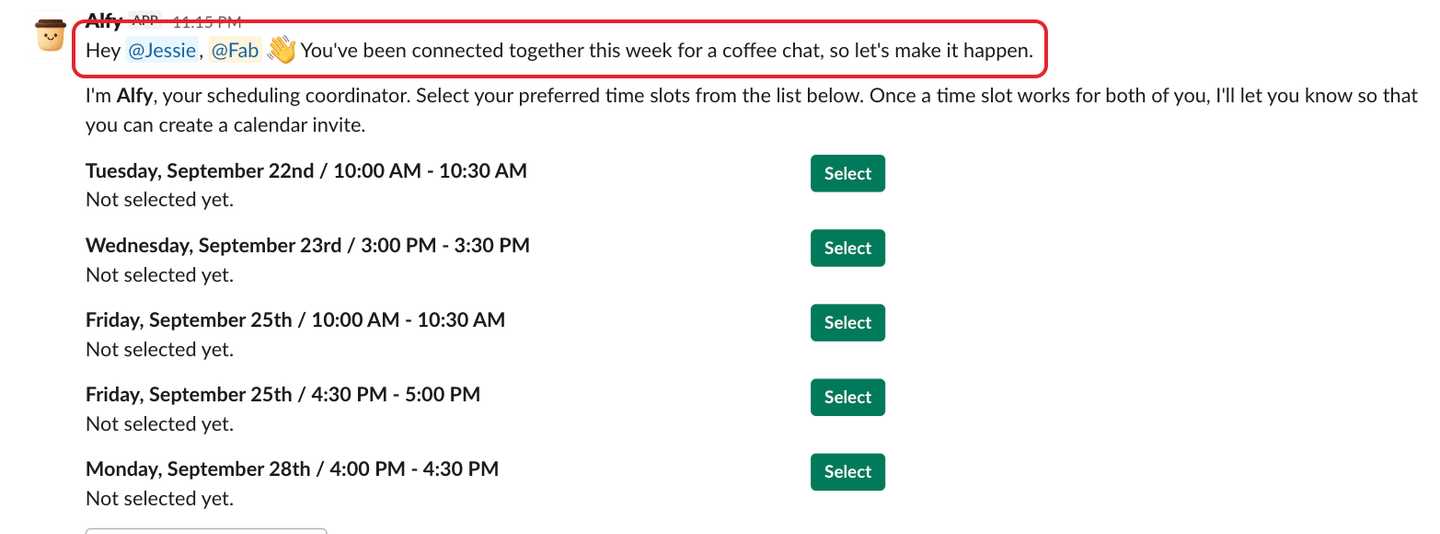
If the program uses Send group DM or Both, Alfy opens a group DM with each group. It says hello and shows "📅 Here are some times you're all free this week", with a Send calendar invite button on each time. Once the chat is scheduled, it shares a conversation starter. See schedule your coffee chat.
Scheduling notices#
When someone in a match sends, moves or cancels the calendar invite, or says the match won't meet, Alfy tells the others in a DM, for example "🎉 … sent you a calendar invite". The invite itself comes from that person's Google or Outlook calendar.
The reminders#
Until a match schedules its chat, Alfy sends reminders with ✅ We've scheduled it and 🙅 We won't meet this time buttons. They go to the group DM, or to each person by DM (Slack and Microsoft Teams) or email when there's no group DM. See answer Alfy's coffee chat reminders.
The welcome message (Slack)#
The first time someone opens Alfy's Home tab, Alfy sends them a "Welcome to Alfy 👋" message, unless Alfy has already sent them a DM, such as a reminder.
To admins#
- Setup done: a message to the person who installed Alfy when the first program is created.
- Channel errors: when Alfy can't post in a channel. See troubleshoot common Alfy errors.
These arrive as a Slack or Teams message from Alfy. One exception comes by email: the "⚠️ Alfy Slack sync issue detected" alert (or the Microsoft Teams equivalent) when Alfy can't sync a channel.
In Microsoft Teams only#
When you add Alfy to a channel or group chat, Alfy sends you a private message with a 🚀 Create a program button. Alfy doesn't post anything in the channel itself until the first round. If you open a personal chat with Alfy, it also sends a welcome card explaining how it works.