Redeem a Clappy reward with your claps
Spend your claps on a reward your company offers in Clappy, from the Rewards tab of the BuddiesHR web dashboard, and follow your claim until it's approved.
 SlackUpdated Oct 7, 20262 min read
You can spend your claps in Clappy, the BuddiesHR kudos app for Slack, on the rewards your company offers. You claim rewards on the Rewards tab of the BuddiesHR web dashboard, and someone at your company reviews each claim.
Step 1: Open the Rewards tab#
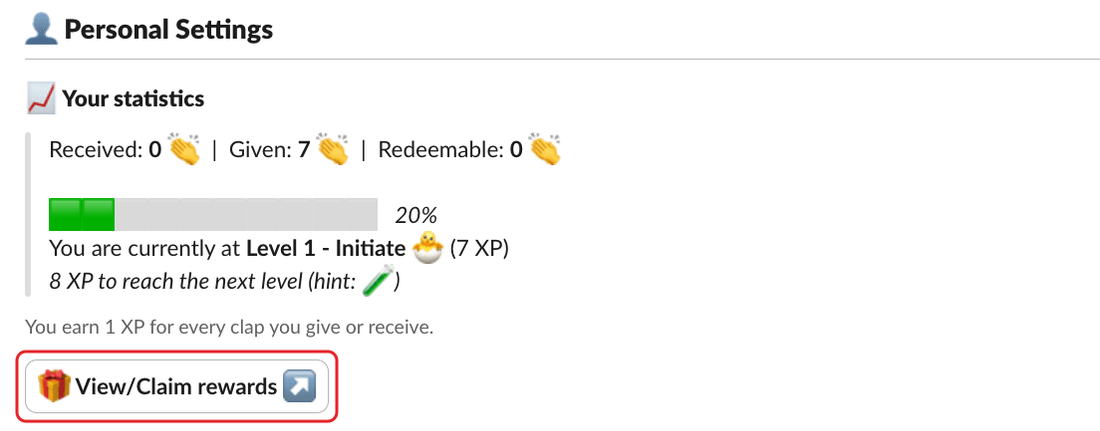
In Slack, click 🎁 View/Claim rewards ↗ in the 📈 Your statistics section of Clappy's Home tab. The dashboard opens on the Rewards tab.
Already on the dashboard? Click the Rewards tab of the personal side, or View and claim rewards on the Home tab.
Step 2: Click Claim on the reward you want#
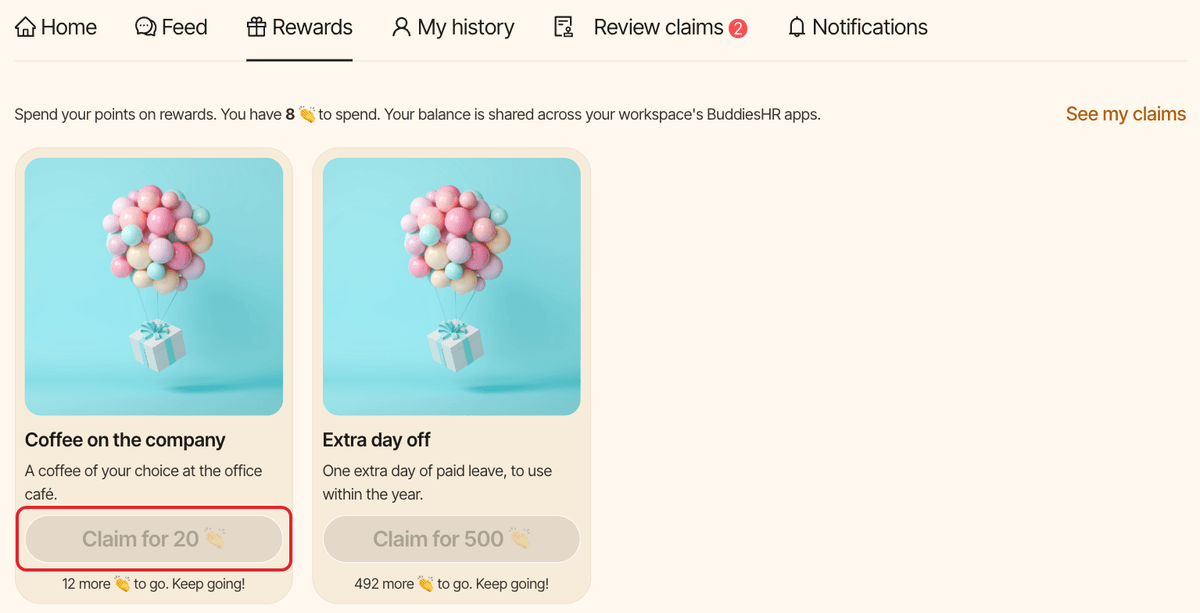
At the top of the tab, you see how many claps you have to spend. Each reward card shows its title, its description and a Claim for N 👏 button, for example Claim for 20 👏. If you don't have enough claps yet, the button is disabled and the card says how many more you need, for example "5 more 👏 to go. Keep going!".
Step 3: Confirm your claim#
A window asks Claim "<reward>"? and reminds you that the claps are taken from your balance now, and given back if your claim is rejected. Click Claim for N 👏 to confirm. You see "Claim sent! A reviewer will get back to you."
What happens next#
- The claps are taken from your
Redeemablebalance right away and set aside while your claim is reviewed. - Clappy sends you a confirmation: "Confirmation: your claim request for … has just been sent for review ✅".
- The people who review reward claims at your company are notified. They'll contact you if they need anything to deliver the reward.
- When they decide, Clappy tells you: "Your reward claim was approved 🎉", or "Your reward claim was rejected" with your claps back in your balance. A reviewer can add a note.
These messages come by Slack direct message or by email, depending on your notification settings. You can change where you get them, or turn them off, with Your reward claims and Decisions on your claims on the dashboard's Notifications tab.
Follow your claims#
On the dashboard, open My history (or click See my claims on the Rewards tab) and pick Claims. Each claim shows Pending review, Approved or Rejected, with the reviewer's note if there is one.
You can claim the same reward again later.
Troubleshooting#
- "You don't have enough claps for this reward yet.": your balance went down since the page loaded. Check your
Redeemablebalance. - "This reward is no longer available.": an admin turned the reward off or removed it.