Export Clappy recognitions to Excel
Clappy admins can download every kudos given over a period as an Excel (.xlsx) file, with giver, recipients, claps, message, visibility and company values.
 SlackUpdated Oct 7, 20261 min read
Clappy admins can download all recognitions for a period as an Excel file from the Leaderboards tab of the BuddiesHR web dashboard.
Step 1: Open the Leaderboards tab#
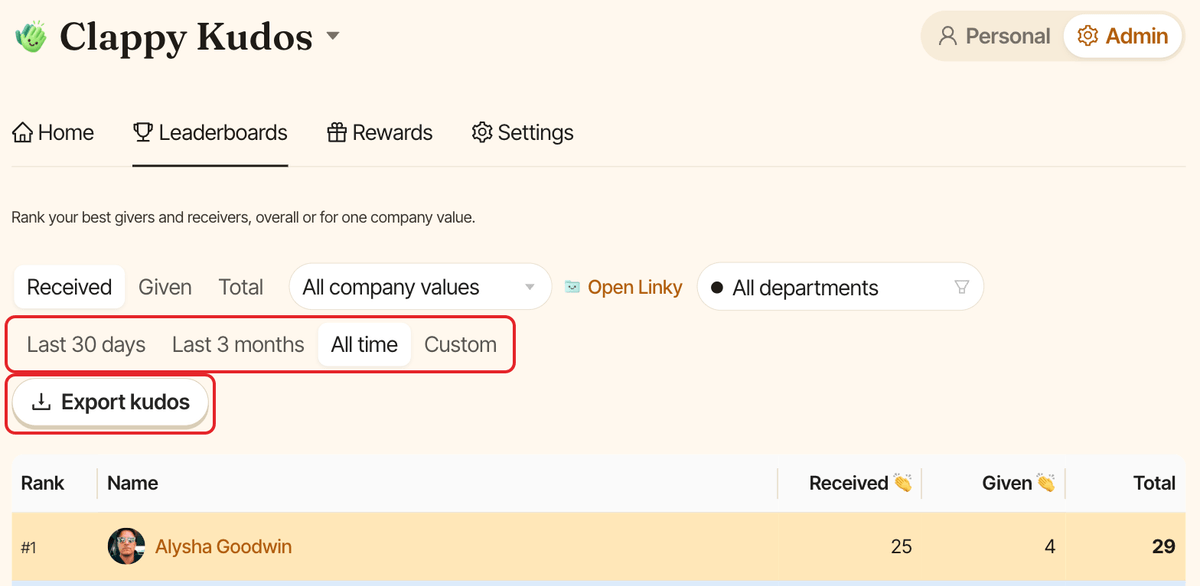
In the BuddiesHR web dashboard, open Clappy, switch to Admin and click the Leaderboards tab. You can also click View all on a leaderboard of the insights dashboard.
Step 2: Pick a period#
Choose Last 30 days, Last 3 months or All time, or pick Custom and select a start and end date.
The export only uses the period. The other filters (Received, Given or Total, the company value and the department) don't apply to it.
Step 3: Click Export kudos#
Click Export kudos. Your browser downloads a file named clappy-kudos-<date>.xlsx.
What's in the file#
One row per recognition, newest first, with these columns:
| Column | Content |
|---|---|
ID |
The recognition's identifier |
Date |
The day it was given, in your company timezone |
Giver |
Who gave it. Empty for extra claps from an admin. |
Granted by |
For extra claps, the admin who gave them |
Recipient A, Recipient B, ... |
One column per recipient |
Points |
Claps per recipient |
Message |
The message |
Visibility |
public or private |
Company Values |
Values attached |
Joins shout-out |
For claps added with Clap this too 👏, the ID of the recognition they were added to |
People are listed by name.