What messages does Clappy send in Slack?
Every direct message, channel post and email Clappy sends, who gets it and when, and how to turn each notification on or off in Slack or by email.
 SlackUpdated Oct 8, 20263 min read
Clappy, the BuddiesHR kudos app for Slack, sends direct messages and channel posts when people give claps, on Appreciation Day, about rewards and for a few reminders. You choose which of your own notifications you get, and where (Slack or email), from the Notifications tab of the web dashboard.
Messages everyone can receive#
The Notifications column shows the switch that controls each message. Messages without a switch can't be turned off.
| Message | When | Where | Notifications |
|---|---|---|---|
| Welcome to Clappy | The first time you open Clappy's Home tab, or when you join the Slack workspace | Direct message | None |
| Welcome message from your admins | When an admin sends Clappy's welcome message | Kudos channel and direct message | None |
| Public recognition | Each public recognition | Kudos channel | None |
| Clap this too | Each time someone adds claps to a public recognition | Thread of the recognition | None |
| You received claps | Each time someone gives you claps | Direct message | Kudos you receive |
| You gave claps | Each time you give claps, with how many you have left | Direct message | Kudos you give |
| Someone added claps to your kudos | When someone adds claps to a recognition you received or gave | Direct message | Someone joins kudos you received, Someone joins kudos you gave (off by default) |
| You added claps | Each time you add claps to someone's recognition | Direct message | Kudos you join (off by default) |
| Appreciation Day | Kickoff, midday and recap posts (the ones your admins turned on), plus a reminder at kickoff if you still have claps to give | Channel, and direct message if your admins turned it on | Appreciation Day (direct message and email only) |
| New level unlocked | When you reach a new level, with your certificate | Direct message | New levels |
| Reward claim sent | When you claim a reward | Direct message | Your reward claims |
| Claim approved or rejected | When a reviewer decides on your claim | Direct message | Decisions on your claims |
| Reminder to give kudos | If you've given claps before but not in the last 5 weeks, then every 5 weeks, up to 10 times | Direct message | Reminders to give kudos |
Messages for admins and reviewers#
| Message | Who | When |
|---|---|---|
| Clappy is live | The admin who finishes the setup | The first time Clappy's settings are saved |
| New reward claim request | Reward reviewers | Each claim, in Slack and by email. Switch: Claims to review. |
| Claims waiting for review | Reward reviewers | 3, 7 and 14 days after a claim that's still pending |
| Channel error | Clappy admins | When Clappy can't post in a channel. See Clappy can't post in my channel. |
Turn notifications on or off#
Step 1: Open the Notifications tab#
In the web dashboard, open Clappy's personal side and click the Notifications tab. If you're a Clappy admin, pick Personal in the Personal / Admin toggle first.
Shortcut: Appreciation Day and reminder direct messages, and every Clappy email, end with a Manage your notification settings link that opens this tab.
Step 2: Flip the switches#
Each notification has one switch per place it can reach you: Slack and Email. Changes are saved right away.
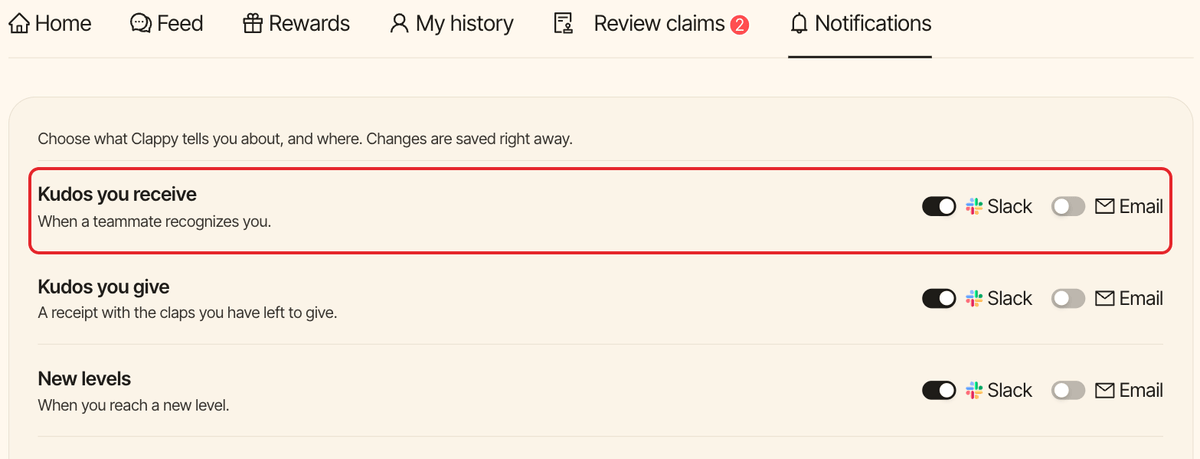
By default, notifications are on in Slack and off by email, except the three "joins kudos" notifications, which are off everywhere, and Claims to review, which is on everywhere. The reward notifications only show once your company offers rewards, and Claims to review only for reward reviewers.