Find your Clappy personal settings
Your Clappy claps, level, leaderboard and latest kudos are on Clappy's Home tab in Slack and on the personal side of the BuddiesHR web dashboard.
 SlackUpdated Oct 7, 20262 min read
Your personal side of Clappy, the BuddiesHR kudos app for Slack, lives in two places: Clappy's Home tab in Slack, and the personal side of the BuddiesHR web dashboard. Both show your claps, level, remaining claps and the leaderboard. The dashboard also has the full feed, the rewards and your history.
In Slack: Clappy's Home tab#
Step 1: Go to Clappy's Home tab#
Not sure where it is? Follow how to find Clappy's Home tab.
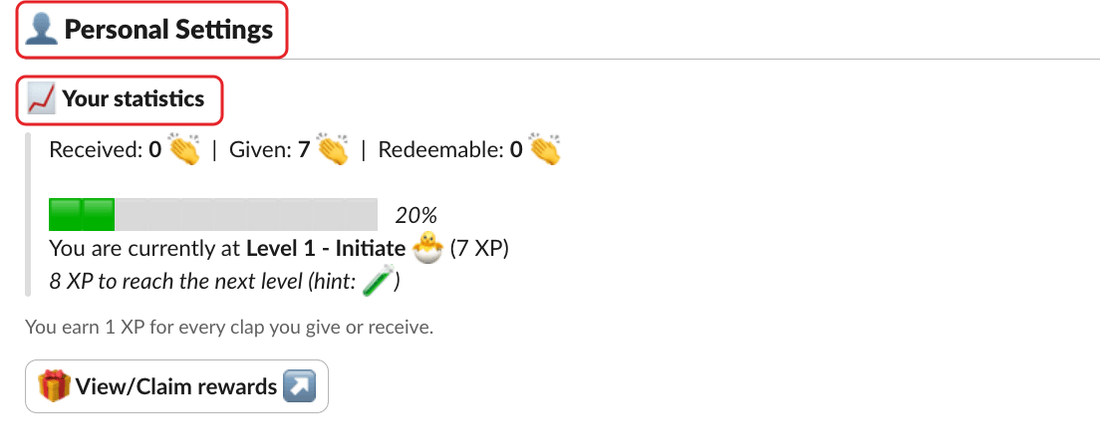
Step 2: Find the Personal Settings section#
Scroll to 👤 Personal Settings. If you're a Clappy admin, it comes after the ⚙️ Admin Settings section. It contains:
📈 Your statistics: your claps and your level. See your statistics.⏳ Current period status: the claps you have left to give. See remaining claps.🏆 Leaderboard, if your company shows it. See the leaderboard.🆕 Latest activities: the latest recognitions. See latest activities.
On the web: the BuddiesHR web dashboard#
Click Open the dashboard ↗ at the bottom of Clappy's Home tab, or 🎁 View/Claim rewards ↗ if your company offers rewards. You're signed in to the dashboard and land on Clappy's personal side. Trouble signing in? See sign in to the web dashboard.
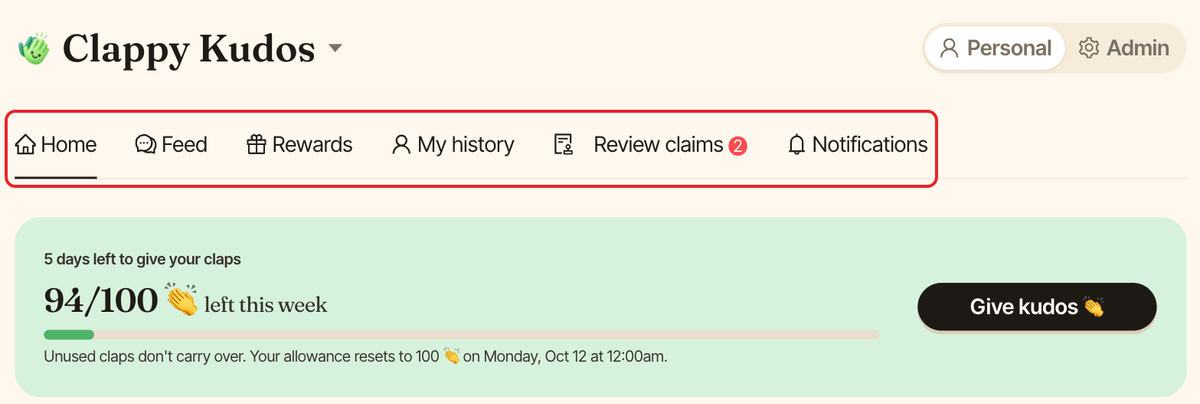
The personal side has these tabs:
Home: the claps you have left (with aGive kudos 👏button), your statistics and level, and the leaderboard.Feed: every public kudos in your workspace.Rewards: the rewards you can claim. Only shown if your company offers rewards. See redeem a reward.My history: everything you gave and received, private kudos included, and your reward claims.Review claims: only for the people who review reward claims.Notifications: choose which Clappy notifications you get, and where.