Opt out of Billy birthday celebrations
Stop Billy from celebrating your birthday or work anniversary and sharing the date with your coworkers, in Slack or Microsoft Teams. You can opt back in.
 Slack
Slack Microsoft TeamsUpdated Oct 5, 20261 min read
To opt out of Billy's celebrations, check the Opt out box under your birthday or work anniversary in Billy's Home tab (Slack) or turn on the opt-out toggle in the SetDates card (Teams). You can opt back in at any time.
When you opt out of an event, Billy doesn't celebrate it, hides it from upcoming events and reminders, and shows OPT OUT in the admins' import file. Admins can see who opted out.
In Slack#
From Billy's Home tab (recommended)#
Open Billy's Home tab. In the Hey buddy 👋 section, check "Opt out - your birthdate won't be shared with your co-workers, and no celebrations will be conducted for your birthday." Do the same under Your work anniversary 💼 if needed.
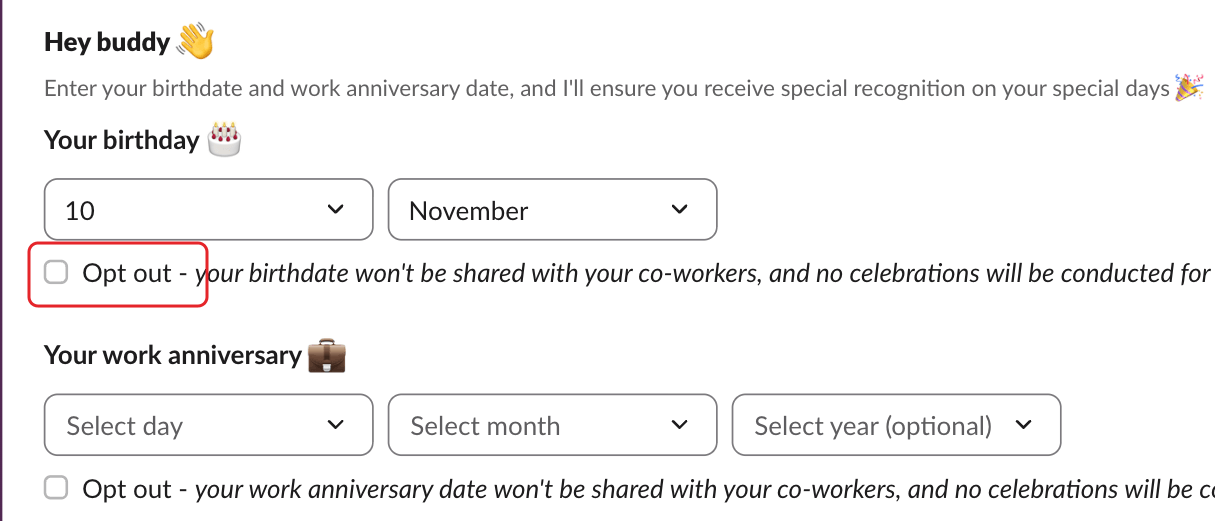
To opt back in, uncheck the box.
From one of Billy's messages#
Billy's messages asking for your dates have an Opt out 👋 button.
In Microsoft Teams#
Step 1: Open the dates card#
In your 1:1 chat with Billy, type SetDates.
Step 2: Turn on the opt-out toggle and confirm#
Turn on "Opt out - your birthdate won't be shared with your co-workers…" under Your birthday 🎂 (or the work anniversary one), then click ✔️ Confirm.
To opt back in, turn the toggle off and click ✔️ Confirm again.