Find your personal Billy settings
Where to find your own Billy settings: the Hey buddy section of Billy's Home tab in Slack, or commands in your 1:1 chat with Billy in Microsoft Teams.
 Slack
Slack Microsoft TeamsUpdated Oct 5, 20261 min read
In Slack, your personal settings for Billy, the BuddiesHR birthday bot, are in the Hey buddy 👋 section of Billy's Home tab. In Microsoft Teams, you use commands in your 1:1 chat with Billy.
In Slack#
Step 1: Open Billy's Home tab#
Not sure how to get there? Follow find Billy's Home tab.
Step 2: Look for the Hey buddy section#
On Billy's Home tab, look for Hey buddy 👋. It has Your birthday 🎂, Your work anniversary 💼 (if work anniversaries are on), Your reminders ⏰ and Upcoming events 🗓 (these last two are hidden once a free trial has ended without a subscription). If you're an admin, it's below the admin settings.
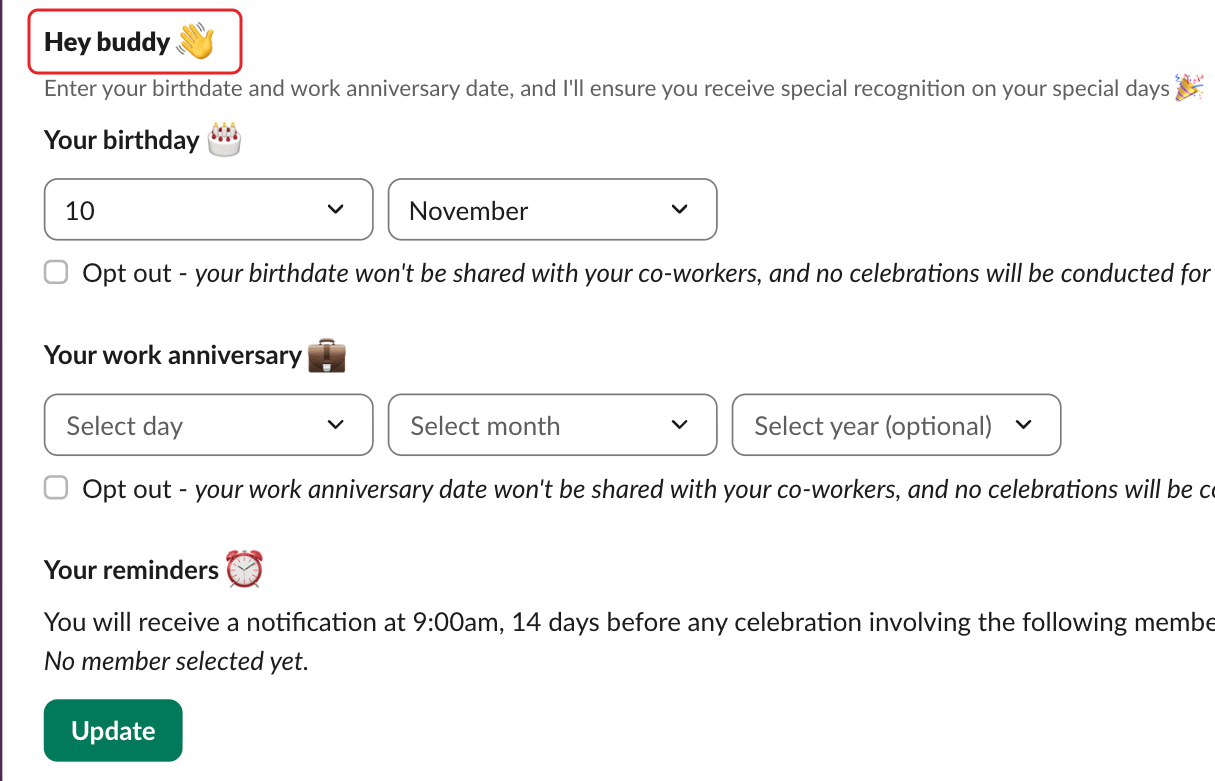
The Home tab is in your Slack language (English, French, Spanish, Portuguese or German), or in English.
In Microsoft Teams#
Open your chat with Billy and type Help. See use Billy as a team member in Teams.